EasyApplys · Saved · 98xxxxxx21, hr@brightlabs.in
Priya · Talent AcquisitionBright Labs · 2h
EasyApplys is a Chrome extension that reads every Naukri and LinkedIn job, applies only where your resume fits, answers the screening questions, and sends your resume to recruiters on WhatsApp and Gmail.
Job hunting means opening hundreds of tabs, typing the same answers again and again, and messaging recruiters one by one. EasyApplys does all of it for you, carefully, so you can spend your time on interviews.
Four steps and EasyApplys knows who you are, what you want, and how to answer every form.
Drop your PDF. EasyApplys fills your profile, works out your exact years of experience, groups your skills and gives you an ATS score with the 3 changes that raise it most.
Press "Suggest with AI" and get best-match, related and stretch roles for your resume, plus words that mean "skip this job", like Senior or Sales.
Notice period, CTC, years with each skill and Naukri's chatbot questions are answered from your profile. A new question waits for you once, then every later job reuses your answer.
Open the side panel, choose Naukri or LinkedIn and press Start. Or turn on the daily auto-run and it begins by itself every morning while Chrome is open.
Find & scan reads LinkedIn hiring posts, saves the recruiters' phone numbers and emails, then sends your message and resume to each one, automatically, one after another.
Only real hiring posts for your roles. Job-seeker posts are skipped.
WhatsApp up to 20 a day, 1-2 minutes apart. Gmail with your resume attached.
Gmail opens, writes your email, attaches your resume and sends it, 20-40 seconds apart so it never looks like spam. Sent contacts clear themselves and come back as follow-ups after 3 days.
Every tool you need from the first application to the offer letter.
Searches every role in every city, newest jobs first. Applies on Naukri (including its chatbot questions) and LinkedIn Easy Apply. When a search runs dry it widens by itself: 24 hours to 7 days, then any work mode. Jobs from cities you didn't pick are skipped.
Every job is compared with your resume and your experience.
Answered once, reused on every job. If a form says "invalid", the AI fixes the format and tries again.
Best-match, related and stretch roles, skills grouped, and skip words for jobs you don't want.
Your timeline, exact experience, skills by category and the 3 changes that raise your score most.
Scan finds 20 recruiter numbers, then sends your message and resume to each one by itself. Sent numbers clear from the list. 20 a day keeps your number safe.
Gmail writes your email, attaches your resume and sends it, 20-40 seconds apart. No daily limit.
Type a company, get its HR team's emails. Email them in one click.
A short, personal "Interested" under posts that fit you. Up to 30 a day, minutes apart.
A "Prep" button on every job you applied to: likely questions with answer tips from your resume.
Applied → calls → interviews → offers. Match % for every job, CSV export, and follow-up reminders.
Starts applying by itself at the time you pick, every day, while Chrome is open.
Start, pause, stop. Today's count, a live line of what's happening, and the full log of every job.
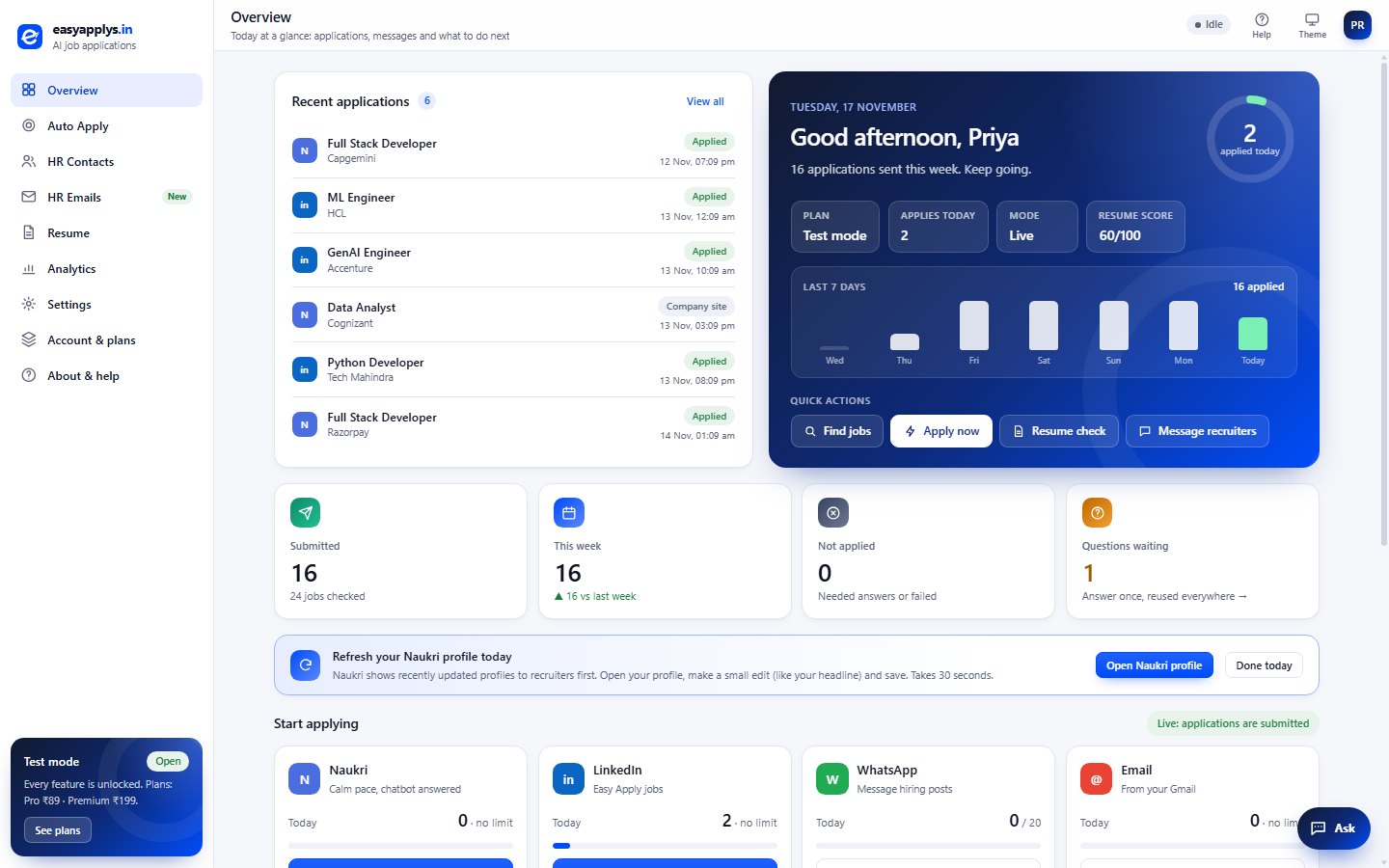
Your day at a glance: applications, the last 7 days and quick actions.
1-2 minutes apart. More can get a number blocked.
Calm, human pace between applications. LinkedIn 1-2 s.
So Gmail never treats you as spam. Start with 30-50 a day.
One per post, minutes apart, only on posts that fit you.
Your profile, resume, answers and contacts are stored only in your browser. To score jobs and write answers, the job text and your resume text go to the AI. EasyApplys never sees or types your passwords or one-time codes: you log in to Naukri, LinkedIn, WhatsApp and Gmail yourself. Read the privacy policy.
Simple prices in rupees. Each payment adds 30 days. No auto-debit, no card needed.
EasyApplys is coming to the Chrome Web Store. During the beta, install it from here.
Click Download and unzip the file into a folder you'll keep, like Documents › EasyApplys.
Type chrome://extensions in the address bar and turn on Developer mode (top right).
Click Load unpacked and pick the unzipped EasyApplys folder.
Pin EasyApplys from the puzzle icon, open it and press Continue with Google.
Follow the 5-minute setup, then press Start on Naukri or LinkedIn in the side panel.

Works on Google Chrome and Microsoft Edge (120+) on Windows and Mac. You stay logged in to Naukri, LinkedIn, WhatsApp Web and Gmail in your own browser.
Download v1.0.0 (.zip)New version? Download again, replace the files in the same folder, then press reload ↻ on EasyApplys in chrome://extensions. Your settings stay.
EasyApplys works inside your own logged-in browser, one job at a time, with calm waits on Naukri (about 10 seconds). It never asks for your passwords. LinkedIn has its own daily Easy Apply limit; when it shows, EasyApplys moves on to Naukri.
No. It reads each job and applies only when your resume is at least a 50% match and the experience fits. It skips cities you didn't pick, titles with words you don't want (like Senior or Sales) and companies you block. You see the reason for every skip.
The AI answers from your resume and profile. If the site says the answer is invalid, the AI fixes the format and retries. If it still can't, the question waits on your dashboard: answer it once and every later job reuses it. Gender, caste, religion and similar are never guessed.
Press Find & scan: it searches LinkedIn hiring posts for your role and saves recruiters' numbers and emails (20 for today's WhatsApp limit). Then it sends your message and resume to each one, one after another. Sent contacts clear from the list and come back as follow-ups after 3 days.
Your profile, resume, answers and contacts stay in your browser on your laptop. Only the job text and your resume text are sent to the AI to score the match and write answers. Read the privacy policy.
Yes. During the beta every feature is free for everyone who signs in with Google. After launch you get a 1-day free trial, then Pro (₹89) or Premium (₹199) for 30 days, paid with UPI, card or netbanking. No auto-debit. See the refund policy.
Until EasyApplys is approved on the Chrome Web Store, Chrome only installs it from a folder with Developer mode on. It's a normal Chrome setting. Once we're on the Web Store you'll install it in one click.
Google Chrome and Microsoft Edge, version 120 or newer, on Windows and Mac.
Download EasyApplys, add your resume and let it apply while you prepare for interviews.